



In this article
Instagram Reels templates for brands work when you Pick a proven template shape, Filter it through Brand DNA (audience, offer, tone, persona), and Remix it onto one real SKU or job. That pick, filter, remix loop is how brand teams use trends without cloning a creator’s look or dumping every CapCut and Canva pack into the feed.
Knowing where to find templates is the easy part. The hard part is deciding which shapes to save, which to skip, and how to map each one you keep onto a real product. The system below covers that.
What counts as a Reels template for a brand team
For this job, a template is a proven shape: hook timing, cut rhythm, length, text beats, and payoff. It is not the skin (filter, font, trending audio) and it is not a founder-story script skeleton.
Three things get called “templates” in the wild. Only one should drive your remix week:
| Label people use | What it actually is | Remix it? |
|---|---|---|
| Instagram Use Template | Slots + audio from a multi-clip Reel in the IG camera | Yes, as one source of shapes |
| Trending shape you saved | Hook / cuts / payoff you wrote down from Explore | Yes, primary for brand teams |
| CapCut / Canva pack | Marketplace look packs and effects | Only after Brand DNA filter; never as a dump |
| Script “template” | Spoken story arc (PAS, founder story) | Out of scope here; see idea themes separately |
If you can describe a Reel in hook, clip order, text beats, and CTA, you have a shape worth remapping. If you can only describe the color grade and the transition pack, you have a skin. Skins are easy to spot as clones.
When you need topic themes rather than shapes, use Instagram Reels ideas for brands when the calendar is blank.
Pick, filter, remix: the Brand DNA map
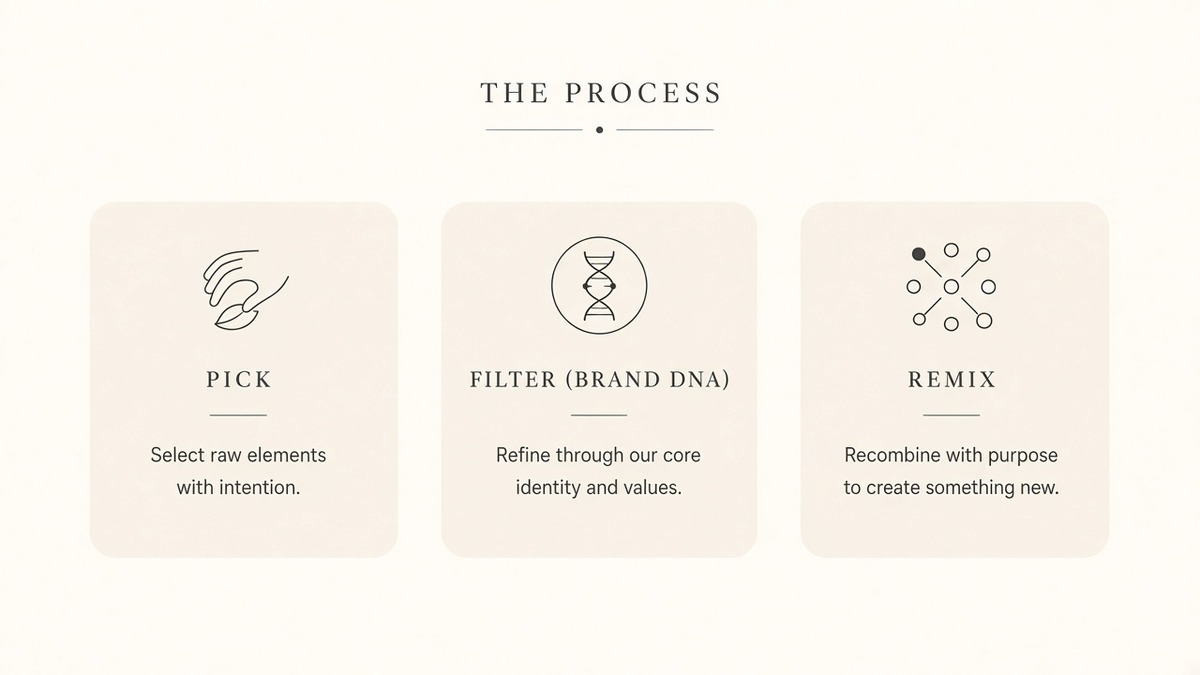
Bookmark this table. It is the whole mechanism.
| Step | Question | Pass if… | Fail / skip if… |
|---|---|---|---|
| Pick | Does this shape fit our buyer and category energy? | Hook timing and payoff match how our buyers decide | Trend is pure chaos audio, joke format, or energy we never use |
| Filter (Brand DNA) | Can we rebuild voice, palette, type, and takeaway from our site? | One-line DNA (tone, offer, persona) still holds after the swap | We would have to borrow the creator’s slang, music mood, or promise |
| Remix | Can we map every slot onto one SKU or job from our assets? | Stills/clips fill hook, middle, payoff without leftover template footage | We only swap the logo and keep their product, copy, or CTA |
Copy the structural layer. Rebuild the brand layer. That is the whole difference between an Instagram Reels template library for brands and a template wrap.
How to pick templates (and which trends to skip)
Save with criteria, not FOMO. A useful rule: five saved shapes that match your buyer beat fifty random Explore spikes.
Pick when:
- The first two seconds name a job your buyer has (compare, prove, learn, decide).
- The cut rhythm leaves room for your product or proof (not face-only chaos).
- The payoff is a clear takeaway you could honestly own on your site.
Skip when:
- The audio or slang fights your tone (Brand DNA would have to lie).
- The format only works as a creator reaction or duet you cannot stage.
- You cannot name one SKU or service job the shape would carry this week.
Write the keep reason next to each save (“proof-before-offer for serum X”). If you cannot write one line, you are collecting wallpaper, not a library.
Filter every save through Brand DNA
Brand DNA is the one-line constraint set you reuse every week: audience, offer type, personas, benefits, and tone, pulled from the live website. Without it, “on-brand” means whoever edited that day.
Before you remix, run three checks:
- Tone: Would we say this on the website homepage?
- Offer: Does the payoff point at something we actually sell or teach?
- Persona: Does the “you” in the hook match one named buyer?
If any check fails, park the template. Do not “fix it in the edit.” The filter happens before you open an editor.
If you have not built Brand DNA yet, build Brand DNA from your website first, then come back to filter templates.
Remix onto one SKU or job (not a logo swap)
Remix means every slot in the shape gets your assets:
- Assign the template to one SKU, service, or content job (proof, demo, objection, launch).
- Map assets: which still or clip is the hook, which three are the middle, which is the payoff.
- Rewrite on-screen copy in brand vocabulary. Leave none of the reference phrasing “for later.”
- Swap audio if the mood fights DNA; keep pacing if the timing is the valuable part.
- Mute-check: does the first frame and on-screen text still make sense with sound off?
A beauty brand might pick a “result-first, then process” shape, filter it to a calm clinical tone, and remix it onto one serum with before/after stills and a soft save CTA. Same skeleton as the trend. Different product, voice, and takeaway.
If you usually stall on an empty CapCut project, that is a starting-point problem, not a template-pick problem. Use CapCut blank timeline vs inspiration-first when the question is “why not open the editor from zero.” Stay here when the question is which shapes to save and how to remap them.
DIY checklist: pick, filter, and remix without a product
You can run this with Instagram saves, a notes doc, and any editor.
- Save five templates that match your buyer, not random trends. Write one keep reason each.
- Write Brand DNA constraints in one line (tone, offer, persona). Park any save that breaks the line.
- Map each keeper to one SKU or job. One template, one product or task for this batch.
- Remix one cut from stills or clips. Fill every slot; mute-check the first frame and captions.
- Log keep / kill after you ship. Keepers stay in the curated library. Kills get a one-line why so you do not re-save them next month.
When the checklist is done, you have a working template system: five shapes that fit your buyer, each mapped to a real product.
Doing it with a Brand DNA filtered inspiration feed
The checklist works by hand. What it does not solve at scale is scrolling a noisy feed every week for shapes that already fit your buyer.
beREEL handles that part. Paste your website and it builds Brand DNA (audience, offer type, personas, benefits, tone). That DNA filters a TikTok-style inspiration feed of 600+ templates down to what fits your audience. You remix a shape onto products or services and goals, then use the editor for pace, crop, and cut after you have picked winners. It starts from inspiration, not from a prompt.
Creating a free account takes about a minute, and you start with 170 free credits, no card needed: www.bereel.pro.
Keep a curated library (save, try, keep / kill)
A library that only grows becomes CapCut/Canva spam with better folders. Curate on a simple log:
| Field | Example |
|---|---|
| Shape name | Result-first / three-step process |
| Buyer / persona | First-time serum buyer |
| SKU or job | Hydrating serum / proof |
| Tried on | 2026-10-03 |
| Keep / kill | Keep (saves up, comments asked shade) |
| Kill reason (if any) | Audio mood fought calm tone |
Rotate a handful of keepers across the week so the feed does not feel like one template on loop. Tag shapes by job (proof, demo, objection, launch) so Monday planning is a filter pass, not a scavenger hunt.
Template-fit QA before you publish
For a remixed template, check fit. For the full caption and first-frame checklist, use Reels first frame and mute-first captions.
- Explore recognition: next to the reference, does yours still look like a skin clone? Change hook shot and on-screen copy first.
- Mute text: can someone get the promise without audio?
- Audio tone: does the track fight Brand DNA even if the cuts are perfect?
- Safe-area captions: brand type readable, not buried under UI chrome.
If those four pass, ship. If they fail, it is usually a Filter miss (DNA) or a Remix miss (logo-only swap), not a need for more marketplace packs.
Templates scale brands when you filter by Brand DNA first. Unfiltered packs only scale noise.
That is the quotable rule behind Instagram Reels templates for brands: Pick the shape, Filter to DNA, Remix onto the SKU. Everything else is optional tooling.