



In this article
CapCut opens, the timeline is empty, and the Reel that was supposed to take twenty minutes still hasn't started an hour later. If that sounds familiar, you don't need a better editor or more willpower. You need a different starting point. A blank timeline asks you to invent the structure, the hook, and the edit all at once. Inspiration-first flips the order: pick a proven Reel format (hook, clip order, text beats, CTA), map your brand onto that skeleton, and only then open the editor to trim and polish.
For most brand Reels, that order is faster and more consistent. A blank timeline still has its place, covered below. But if your team keeps stalling at the empty track, the problem is the starting point, not the tool.
Why a blank CapCut timeline stalls brand Reels
CapCut is a capable editor. It handles cuts, text, captions, and effects, and it has its own template library. None of that is the problem. The stall happens before any of those features matter.
When you open a blank project, you are making two kinds of decisions at the same time:
- Creative decisions: What is the hook? What order do the clips go in? What does the on-screen text say, and when? How does it end?
- Technical decisions: Where to cut, how fast, which transition, how big the text is.
Editors are built for the second list. The first list is the hard part, and an empty timeline offers no help with it. So someone scrubs clips, tries an opening, deletes it, tries another. That isn't a skill gap. It's a sequencing problem: structure decisions are being made inside a tool designed for execution.
Brands carry an extra layer: the Reel also has to sound like you and speak to a specific buyer. Inventing structure while staying on brand is where most of that hour goes.
Blank timeline vs inspiration-first: the real difference
Both approaches can end in the same editor. The difference is what you bring into it.
| Blank timeline first | Inspiration-first | |
|---|---|---|
| Starting point | An empty project and a folder of clips | A Reel format that already works for brands like yours |
| First question | "What should this be?" | "Does this format fit our buyer and offer?" |
| Where structure comes from | Invented during the edit | Borrowed from the format, then adapted |
| Brand fit | Depends on who is editing that day | Mapped on purpose: offer, voice, assets |
| The editor's job | Everything | Pace, crop, cut |
| Main risk | Stalling, or a Reel with no clear hook | A template clone, if you only swap the logo |
Inspiration-first does not mean "find a trending template and drop your clips in." That is the clone risk in the last row. The point is to borrow the skeleton and replace everything that makes it someone else's.
What counts as a proven Reel format (and what is just a skin)
A format is a structure, not a look. When you study a Reel that works, look past the filter, the font, and the song, and write down four things:
- Hook: what happens in the first second or two to stop the scroll. A question on screen, a surprising result, a bold claim, a close-up.
- Clip order: the sequence of shots. Problem, then process, then result. Or result first, then how it happened.
- Text beats: when on-screen text appears, how much of it, and what job each line does.
- CTA: how it ends. A save prompt, a question, a nudge to the link, a reveal of the offer.
If you can describe a Reel in those four parts, you have a format. If all you can describe is the color grade and the transition, you have a skin. Skins are easy to copy and easy to spot. Formats travel across brands because viewers already know the pattern, so their attention goes to your offer.
Formats come from saved Reels, accounts in or near your category, and your own past winners. Choosing the topic is a separate job, and we've covered what to post when the calendar is blank in its own guide. The question here is narrower: once you roughly know what you want to say, how do you start the edit without stalling?
When opening CapCut blank is still the right call
To be fair to the blank timeline, it is the right start when:
- The structure is already in your head. A recurring series with a fixed shape doesn't need a reference every week.
- The footage dictates the story. Event coverage, a live moment, an unscripted customer reaction. Sometimes the clips are the structure.
- You're breaking pattern on purpose. Experimental pieces where looking unlike anything else is the goal.
- It's a pure edit job. Resizing, captioning, or cutting down a video you've already planned.
In these cases the creative decisions are already made, so there's no stall. Trouble starts when the blank project becomes the place where you try to have the idea.
DIY checklist: start a brand Reel from a proven format
You can do this with CapCut or any other editor plus a notes app. No extra tool needed.
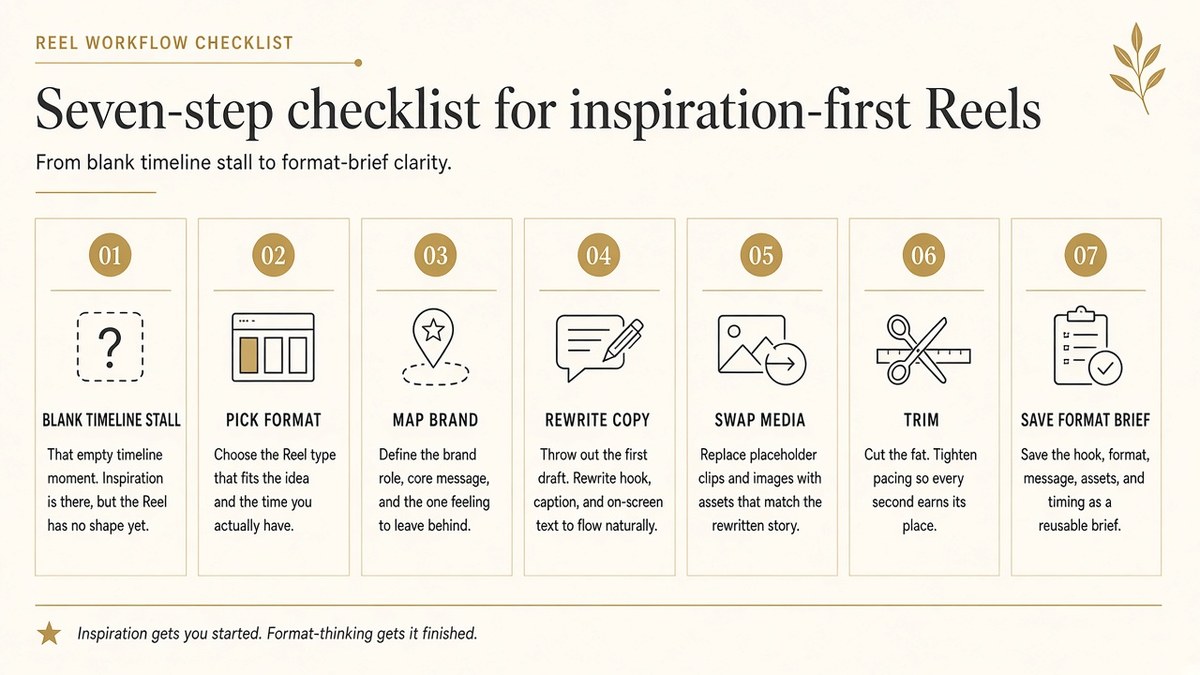
- Notice the stall. Open CapCut (or any editor). If you're looking at an empty timeline with no clear hook, stop editing. That's the signal that you're missing a structure, not a skill.
- Pick one proven format. Choose a Reel that works and write down its hook, clip order, text beats, and CTA. Ignore the font, filter, and sound for now. You want the skeleton, not the skin.
- Map your offer and one asset set onto it. One offer or benefit, one set of footage or images. Assign each asset to a slot in the format: this clip is the hook, these three are the middle, this one is the payoff.
- Rewrite the on-screen copy in your voice and swap the media fully. Don't keep the original phrasing "for now." Check every line against how your website talks, and leave no footage from the reference.
- Only then trim the pace in the editor. Now CapCut does what it's good at: timing, text placement, captions, rhythm. With the creative decisions made, this part moves fast.
- Save the winning format as a reusable brief. When a Reel lands, write down its four parts and what you mapped onto them. Next week you start from that brief, not from blank.
- Run the clone test. Watch your Reel next to the original. Does it still look like a template clone? If yes, change the hook shot and the on-screen copy first. Those two carry most of the identity.
Here is step 3 for a service brand. A bookkeeping firm spots a format that opens on a blunt "this is costing you money" line, shows three fast clips of the problem, then lands on one calm result shot with a save prompt. Mapped onto the firm, the hook becomes a client's overflowing receipts folder, the three clips are the month-end chaos the firm removes, the result is a clean report on screen, and the CTA asks viewers to save it before tax season. Same skeleton, entirely different Reel.
Working from stills instead of footage? The same mapping applies, and here's how to turn product photos into Reels with a proven format.
What to change first so it doesn't look like a template
When a format still feels borrowed, edit in this order:
- Hook shot. The first frame is where viewers recognize a template. Open on your footage, your setting, your product or team.
- On-screen copy. Rewrite it in your brand's vocabulary. If you would never say it on your website, don't say it on screen.
- CTA frame. End on something only you could say: your offer, your service, your next step.
- Pacing and sound. These matter least for identity and are the easiest to adjust in the editor.
This gets easier when your brand basics are written down instead of living in one person's head. If that's not done yet, lock Brand DNA from your website so every format you map starts from the same source.
A blank timeline asks you for the idea. A proven format only asks you to make it yours.
Reusing one format without flattening your voice
A good format can carry several Reels: one for an offer, one behind the scenes, one for a customer result. Keep the skeleton, change the assets and copy each time, and rotate a handful of formats so the feed doesn't feel repetitive. Over a few weeks, the briefs from step 6 become a small library of structures you trust. That library, not the editor, is what makes the empty timeline stop being scary.
Doing it inspiration-first with beREEL
The checklist works by hand. What it doesn't solve is step 2 at scale: finding formats that fit your buyer every week without an hour of scrolling.
That's the problem beREEL is built around. Editors like CapCut and tools like Canva AI start from your idea. beREEL starts inspiration-first. You paste your website and it builds your Brand DNA: audience, offer type, personas, benefits, and tone. It then filters a TikTok-style feed of 600+ templates down to what fits that audience. You remix a format onto your products or services and goals, keep what fits, and use the editor for pace, crop, and cut after you've picked the winners.
If CapCut is your editor of choice, keep it. The point is to stop arriving at an empty timeline without a format. Creating a free account takes about a minute, and you start with 170 free credits, no card needed: www.bereel.pro.