



In this article
Brand DNA for Instagram Reels is a one-page sheet of voice, colors, offer, and buyer pulled from your live website, then turned into Reels defaults so every Reel looks and sounds like you. The method: website, then a Brand DNA sheet, then Reels defaults. Do it once, and you stop re-deciding tone, palette, and who you are talking to every time someone opens an editor.
Most teams already have this information on the site. It just lives in headlines, hero CTAs, FAQ answers, and CSS colors instead of in a place the content team can reuse. This guide shows how to extract it by hand, score draft Reels against it, and keep trends and UGC from drifting off-brand.
What belongs in a Reels Brand DNA sheet (and what stays out)
A Reels Brand DNA sheet is not a 40-page brand bible. It is four fields that survive contact with a vertical video:
- Voice. Three adjectives that match how your site actually talks, plus a short banned list (phrases, hype words, or tones you never use).
- Palette. Two or three colors plus a background treatment taken from the live site, not guessed from the logo mark alone.
- Offer. One line for what you sell right now and who it is for, copied from the hero or pricing page.
- Buyer. The pains and jobs that show up in FAQ copy, testimonials, and “who it’s for” sections.
That is enough to keep on-brand Instagram Reels consistent across people and weeks. Brand guidelines for Instagram Reels often balloon into logo safe zones, every hex code, and photography rules for print. Keep those in the brand kit. The DNA sheet only holds what changes a Reel’s text, cover, caption, and music mood.
Stay out of the sheet:
- A list of Reel ideas (that is a different job: what to post when the calendar is blank).
- Editor settings, transitions, or tool tutorials.
- A logo placement rule as the whole “brand system.” A watermark does not fix off-voice captions.
Pull voice, colors, offer, and buyer from your website
You do not need a new workshop. You need a pass over pages that already exist. This checklist is the whole DIY method. Print it, paste it into a doc, or keep it in Notion. No product required.
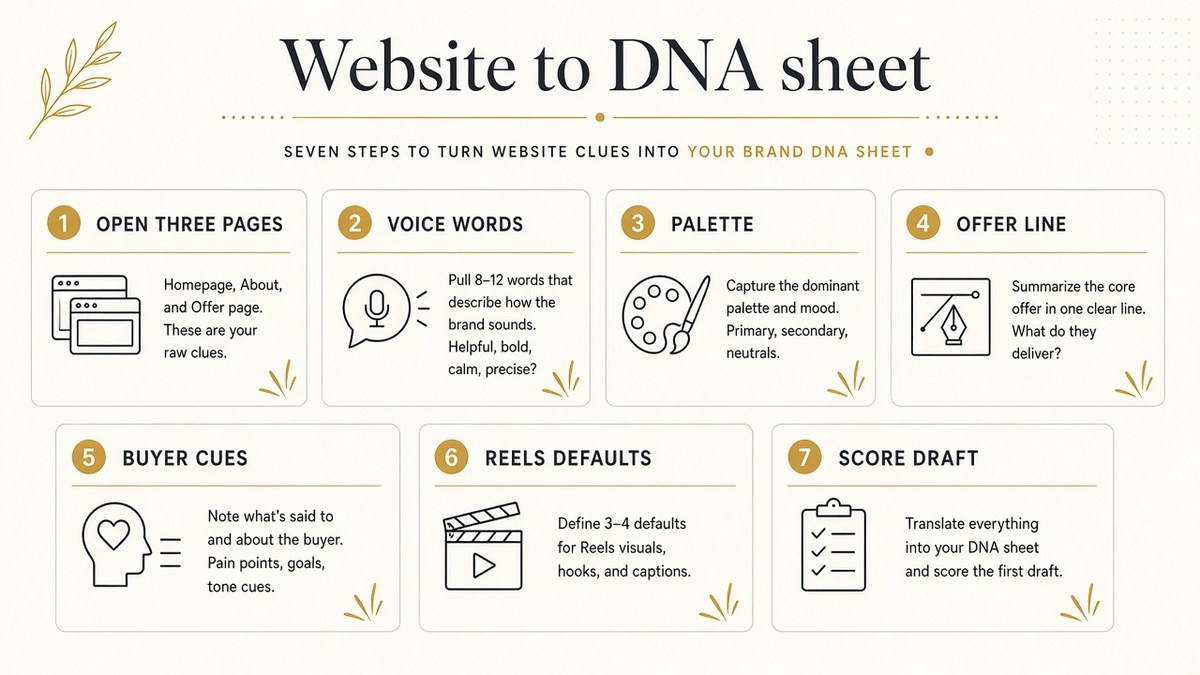
Website → Brand DNA sheet checklist
- Open three pages. Homepage, About (or equivalent), and your top product or service page. These three carry almost all of the signals you need.
- Capture voice words. From headlines and body, write three adjectives that fit (for example: calm, precise, warm). Add three banned phrases you would never put on screen.
- Note the palette. From the hero and CSS (or eye-dropper on the live site), record two or three brand colors plus the usual background. Do not invent a “Reels palette” that is not on the site.
- Write the one-line offer. From the hero CTA or pricing block: what you sell + who it is for, in one sentence.
- List buyer cues. From FAQ and testimonials, pull three pains or jobs-to-be-done. These become hooks and caption angles later.
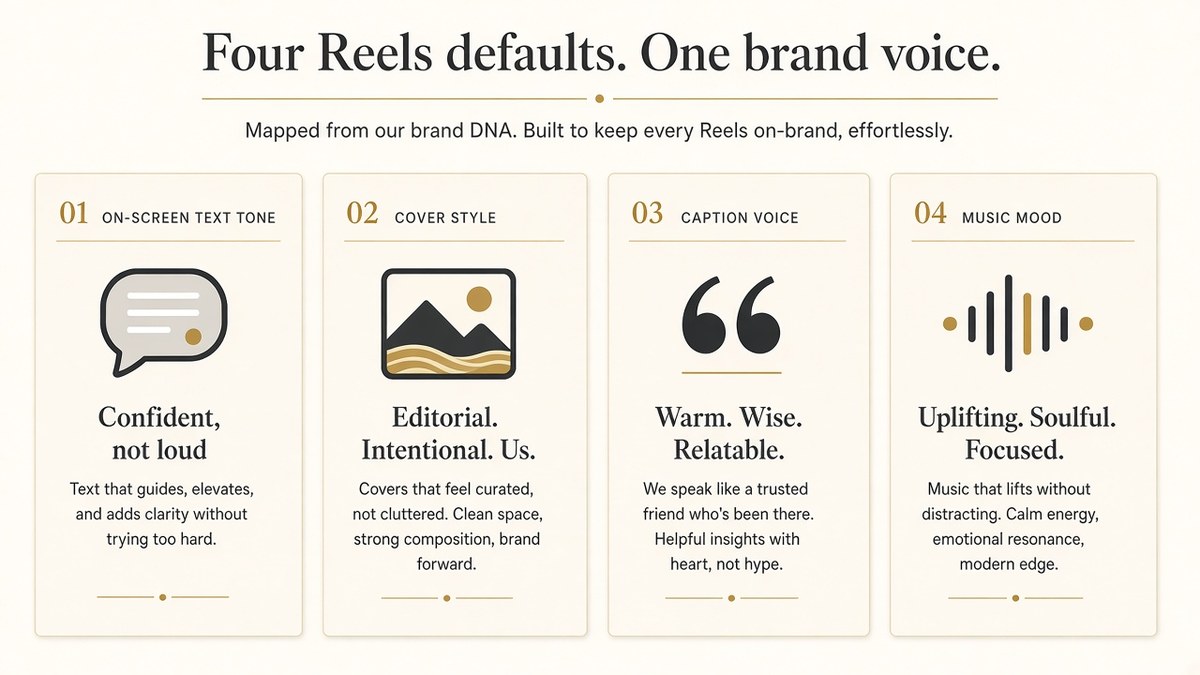
- Translate DNA into Reels defaults. Map the sheet into four production defaults: on-screen text tone, cover style, caption voice, music mood (see the next section).
- Score the next draft Reel against the sheet before publish. Use the four-point scorecard below. If it fails two or more, rewrite before upload.
When the checklist is done, you have brand DNA for Instagram Reels that anyone on the team can apply. The sheet is the source of truth. The Reel is the test. With buyer cues written down, the next move is selection: filter your Reels idea backlog by buyer persona before you invent more hooks.
If you'd rather skip the manual pass, paste your website into beREEL. It builds your Brand DNA from the site (audience, offer type, personas, benefits, tone), reuses it for every Reel, and recommends templates that fit your audience to remix. A free account takes about a minute and starts with 170 free credits, no card.
Turn website brand DNA into Reels-ready defaults
A DNA sheet that sits in a doc does nothing. Translate each field into defaults you can check in under a minute:
| DNA field | Reels default | Pass test |
|---|---|---|
| Voice | On-screen text tone + caption voice | Would this line fit on the homepage? |
| Palette | Cover background + text color | Colors match hero/CSS, not a trending template |
| Offer | What the Reel is selling or proving | One clear product, service, or benefit |
| Buyer | Hook angle and who the “you” addresses | Names a pain or job from the FAQ/testimonials |
On-screen text tone. Match the site’s sentence length and formality. If the homepage never shouts, the Reel should not either.
Cover style. Use brand background or a clean product/service still with text in brand colors. Avoid random gradient packs that belong to someone else’s template.
Caption voice. Rewrite caption drafts against the three voice adjectives and the banned list. If a line only works with slang your site never uses, cut it.
Music mood. Pick energy that fits the offer and buyer, not whatever is trending this week. A calm premium brand on hyper meme audio fails the sheet even if the cut is clean.
The goal is recognition without looking like an ad. Soft brand cues (palette, type feel, consistent voice) do more work than a logo on every frame. When you later turn product photos into on-brand Reels, the same DNA sheet is the input that keeps those cuts sounding like you.
Your website already wrote your Reels style guide. The job is to extract it once, not reinvent it every upload.
Score a draft Reel against the sheet before you post
Before anything goes live, run a four-point audit. Score each item yes or no. Two or more “no” answers means revise, not polish.
- Voice. On-screen text and caption match the three adjectives and avoid the banned list.
- Palette. Cover and text colors match the sheet (or a deliberate, documented exception).
- Offer. The Reel proves or sells the one-line offer, not a vague “brand vibe.”
- Buyer. The hook speaks to a pain or job from the buyer cues, not a generic scroller.
This is how brand guidelines for Instagram Reels become operational instead of decorative. The sheet does not replace taste. It removes the weekly re-debate about what “on-brand” means.
What breaks on-brand consistency (and how the sheet stops drift)
On-brand Instagram Reels usually fail for system reasons, not talent reasons.
Trend remix without a brand layer. Keeping a viral structure is fine. Keeping someone else’s voice, palette, and punchlines is not. Remix the skeleton; rewrite every word against the DNA sheet.
UGC that ignores the offer and buyer. Customer clips are strong when they map to a buyer cue and the one-line offer. Unfiltered UGC that only “feels fun” pulls the feed off the site’s voice within a few posts.
Logo-as-brand. Stamping a mark on every frame does not fix off-voice captions or wrong colors. Color, text tone, and cover treatment carry recognition faster than a watermark.
Scattered rules. When voice lives in a PDF, palette in Figma, offer in a sales deck, and buyer notes in someone’s head, every Reel restarts from zero. One website-sourced sheet collapses that drift.
A website-sourced DNA sheet is different from copying a viral Reel template or only watermarking a logo. The template gives structure. The logo gives a mark. The sheet gives the reusable brand layer: voice, palette, offer, buyer. Structure without that layer is a costume. A mark without that layer is stickers on someone else’s video.
How often to refresh the sheet
Refresh when the site changes, not on a fixed content calendar:
- Offer or pricing changes on the hero or pricing page.
- Messaging on the homepage or About page is rewritten.
- Palette updates in the live CSS or redesign.
- Buyer language in FAQ or testimonials shifts (new segment, new pain).
A light quarterly skim is enough for stable brands. Launch weeks and redesigns deserve a same-day update so Reels do not advertise last month’s promise. Until the site moves, leave the sheet alone. Stability is the point.
How to start today
Open the three pages, fill the seven-step checklist, and score one draft Reel against the sheet before the next upload. That single pass is enough to make the next week of Reels sound like the same brand that wrote your website.
When you want the sheet locked automatically from the live site, paste the URL into beREEL and reuse Brand DNA on every Reel from there. A free account takes about a minute and starts with 170 free credits, no card.