



In this article
Instagram Reels ideas for restaurants and cafes fill tables when each cut follows the Fill-Tables Reel Map: appetite in the first frame, a local signal that proves you are nearby, then one clear reserve, order, or directions CTA. Pair every idea with a 3 to 5 clip shot list so your team can film in a slow hour or remix from dish stills you already have.
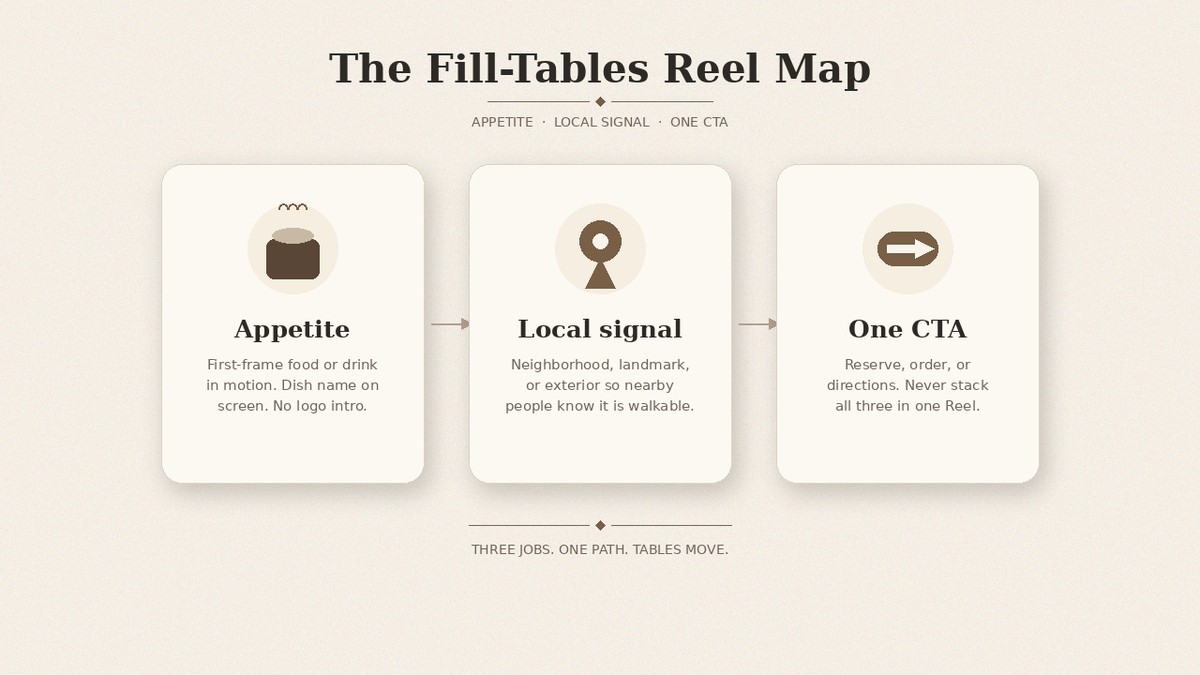
A hungry scroll stops for steam, pour, cheese pull, or plating. It keeps watching when the neighborhood or landmark shows up. It acts when the end card offers one path only. Views from another city do not seat a table. The map below is for restaurant and cafe teams who want Reels that fill tables this week without looking like every other food account.
For non-food brands still staring at an empty week, use Instagram Reels ideas for brands when the calendar is blank.
The Fill-Tables Reel Map
Use this structure on every idea in the table. Do not add a second CTA mid-Reel.
- Appetite (frame 0 to ~2s): mute-first macro of food or drink in motion. Dish name on screen. No logo intro.
- Local signal: neighborhood name, landmark, exterior, or “two blocks from [place]” so nearby people know it is walkable.
- One CTA: reserve, order, or directions. Never stack all three.
That sequence is the Fill-Tables Reel Map: appetite, local signal, CTA. Foodservice Reels shot lists only work when those three jobs stay in order.
Bookmarkable ideas with shot lists
Pick five for this week’s menu and hours. Every row is venue-specific.
| Idea | Best for | Shot list (3 to 5 clips) | Soft CTA |
|---|---|---|---|
| Signature plating | Restaurant | 1) Macro sauce or garnish drop 2) Plate spin or chef wipe 3) Hands placing last herb 4) Full plate on table 5) Exterior or neighborhood line | Reserve |
| Pour / latte art | Cafe | 1) Steam wand close-up 2) Milk pour into cup 3) Latte art finish 4) Cup on wood with logo napkin 5) Door or street sign | Directions or order |
| Kitchen pass BTS | Restaurant | 1) Ticket rail 2) Hands plating at pass 3) Server lift 4) Dining room blur 5) Soft “tonight’s hours” card | Reserve |
| Staff favorite | Both | 1) Staff face or hands (permissioned) 2) Dish or drink they pick 3) One-sentence why on screen 4) Bite or sip 5) Local line | Order or reserve |
| Opening ritual | Cafe | 1) Lock turning / lights on 2) Grinder or pastry case 3) First pour 4) Empty chairs filling 5) “Open until” + neighborhood | Directions |
| Regulars / community | Both | 1) Familiar table or stool 2) Permissioned guest moment 3) Same order on the pass 4) Staff wave 5) Soft “see you” + map pin | Directions |
| Weekend special | Restaurant | 1) Special board scribble 2) Ingredient prep 3) Finished plate 4) Two-top set 5) “Sat-Sun only” + reserve path | Reserve |
| Dish-from-stills remix | Both | 1) Hero still push-in 2) Detail crop (crumb, foam, glaze) 3) Hands or room still 4) Exterior still 5) CTA end card | Order, reserve, or directions |
| Cheese pull / sizzle opener | Restaurant | 1) Pull or sizzle mute-first 2) Knife or spatula 3) Plated share 4) Table reaction (no faces required) 5) Neighborhood line | Reserve |
| Morning pastry case | Cafe | 1) Case lights on 2) Tongs lifting pastry 3) Bite cross-section 4) Coffee beside it 5) “Today until sold” + directions | Directions or order |
Mute-check every first frame. If the opening only works with sound, rewrite it.
Film the batch in one slow hour when the floor is calm. Keep the phone vertical. Capture two takes of the hook macro so you can pick the cleaner mute-first open. If the kitchen will not allow a pass shoot, swap kitchen pass BTS for dish-from-stills remix that week and still keep the Fill-Tables Reel Map intact.
On-brand does not mean identical to every other cafe on the block. Same pour, different cup, different neighborhood line, different CTA destination. The map forces those differences into the cut so your Reels look like your venue.
Cafe formats vs restaurant formats
Cafe Instagram Reels ideas lean on pour, morning open, pastry case, and “work-friendly” or dog-friendly proofs when those are true. Restaurant Reels ideas that fill tables lean on plating, pass BTS, weekend specials, and table-for-two setups. Staff favorite, regulars, and dish-from-stills remix work for both. Keep the dish or drink on camera; do not recycle service-business formats that never show a product.
A cafe week might be: pour, opening ritual, morning pastry case, staff favorite drink, dish-from-stills remix of the house cold brew. A restaurant week might be: signature plating, kitchen pass BTS, weekend special, cheese pull opener, regulars table. Mix one “both” idea each week so the feed does not feel like two brands.
When you already have menu photos, turn product photos into on-brand Instagram Reels covers how to turn stills into Reels. Lock the dish name and the local signal before you open the editor so the remix still reads as your room, not a generic food template.
Mute-first hooks that fit foodservice
Open on motion the eye understands without audio: pour, sizzle, cheese pull, knife through pastry, latte art finish. Put the dish name and neighborhood in the safe area. Skip logo-first intros and “Welcome to our restaurant” title cards. Optional trending audio can help discovery; it is not the strategy. To remix a proven layout onto your dishes, remix a proven Reels template.
Write the on-screen line as proof, not a slogan. “Cacio e pepe, East Village” beats “Best pasta in town.” “Oat latte pour, near the library” beats “Coffee worth waking for.” The Fill-Tables Reel Map needs that specificity so appetite and local signal share the first seconds.
A restaurant Reel earns its slot when a nearby stranger can name the dish, the neighborhood, and the next step without unmuting.
What to skip
- Polished catalog ads in frame one (white seamless, no hands, price stack)
- Fake scarcity or invented “selling out tonight” scripts
- Dancing-trend-only cuts with no food on screen
- Generic brand idea matrices copied from a blank calendar post
- Holiday or Black Friday as the main theme of your feed (for that sprint, see Black Friday and holiday Reels ideas for ecommerce)
DIY: film five Reels this week
You can run this by hand today. No product required.
- Pick five ideas from the table that match this week’s menu and hours.
- Write the shot list for each (hook macro, motion, hands, room or exterior, soft CTA frame).
- Pull dish stills or film a slow-hour phone batch.
- Mute-check the first frame and put the dish name on screen.
- Soft CTA: one path only (reserve, order, or directions) per Reel.
- Log keep or kill after the week (saves, shares, profile visits, directions, calls, or orders).
When those steps are done, you have a week of Reels that look like your venue.
If you want help with the formats, paste your website into beREEL. It builds Brand DNA (audience, offer type, personas, benefits, tone) and filters a TikTok-style feed of 600+ templates to your guests, so you remix proven formats onto your dishes. You can make photo and video Reels from stills and clips, keep captions in the safe area, and adjust pace and crop in the editor. Creating a free account takes about a minute, and you start with 170 free credits, no card needed: www.bereel.pro.
How to know a Reel earned its slot
Judge saves, shares, profile visits, and directions, calls, or orders. Vanity views from far away do not fill tables. Keep the local signal honest. Kill ideas that only win likes. Keep ideas that move someone toward a seat or an order.
If a Reel earns saves but zero profile visits, strengthen the CTA frame. If it earns visits but no directions or reserves, check that the bio link, booking tool, or maps pin matches the end card. The map is only as strong as the single path you name.
Ship the five. Log keep or kill. Repeat next week with a fresher special or pastry.