



In this article
Black Friday and holiday Reels for ecommerce brands work best as a short Holiday Reel Sprint in five stages: teaser, offer reveal, proof, urgency, then thank-you or gift guide, each cut from stills and clips you already have. Film desire before the discount, name the real offer and end date, show honest proof, use real stock or shipping cutoffs for urgency, then shift to gift-guide and thank-you formats through December. You do not need a studio day in October.
Most Black Friday Reels end up as the same “X% off” graphic every day. The sprint below gives your brand account a sequence instead: which holiday Reels to cut from Black Friday and Cyber Monday through New Year, in what order, and how to make them from packshots, lifestyle stills, packing B-roll, and customer photos you already own.
After the sale window closes, use Instagram Reels ideas for brands when the calendar is blank.
The Holiday Reel Sprint
Assign each of five priority SKUs or offers to one stage. Post in order across the sale window so every Reel has a job.
| Stage | Job | What to film (from assets on hand) | Mute-first hook pattern | CTA / destination |
|---|---|---|---|---|
| Teaser | Desire before discount | Hero still + light motion, gift wrap detail, product-in-use crop | Problem or desire line; no % yet | Profile or “coming soon” story highlight |
| Offer reveal | Clear deal + window | Offer card over product still; price before/after if honest | Exact offer + end date in frame 0 | Sale landing page |
| Proof | Trust without invented reviews | Customer photo (permissioned), UGC repost, unboxing stills, wear/use clip | One real outcome or quote you can defend | Product page or sale page |
| Urgency | Honest deadline | Packing bench B-roll, low-stock shelf, calendar still with real order-by date | Real shipping cutoff or real stock note | Sale landing page |
| Thank-you / gift-guide | Post-purchase + December shoppers | Staff picks stills, recipient/budget grids, thank-you card over product | “For [recipient / budget]” or “you’re in” | Gift-guide URL or order status / referral |
Five cuts beat twenty interchangeable “festive” posts. If a stage has no asset, skip it; do not invent a shoot day to fill the table.
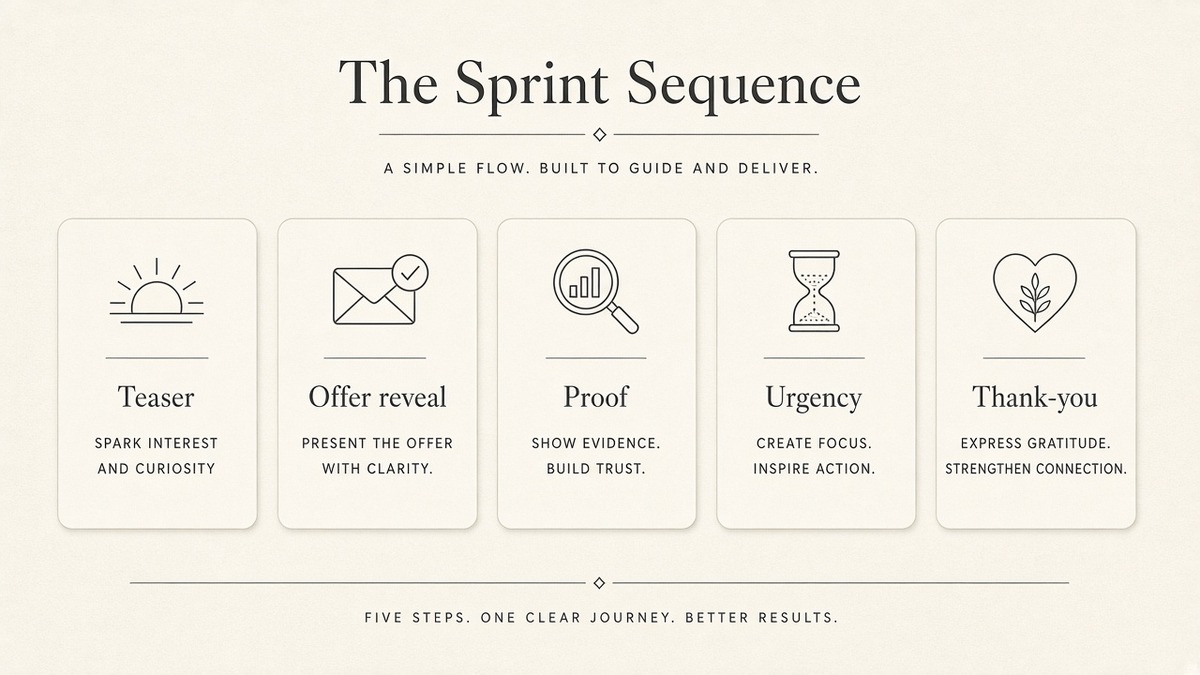
Sequence across pre-sale, BF launch, Cyber Weekend, and December
Pre-sale (about 10-14 days out): run teasers and soft proof. Build desire and save-worthy formats before the offer graphic appears.
BF launch day through Cyber Weekend: offer reveal first, then proof, then urgency. Do not open every day on the same discount frame. Alternate proof and urgency so the feed still feels like content.
Late Cyber through mid-December: keep one honest shipping-cutoff Reel live, then lean gift-guide and staff picks. Christmas Reels ideas for ecommerce brands in this window should answer “who is this for?” and “what ships in time?” more than “what % off remains.”
Post-purchase: thank-you, how-to-use, gift-wrap tips, and referral or second-gift formats. These protect reviews and repeat orders without another discount graphic.
Holiday Reels ideas for online stores fail when every post is a sale end-card. Sequence by shopper job, not by how many ways you can say “shop now.”
Film the sprint from stills and clips you already have
Pull a folder before you open an editor:
- Packshots and colorways for teaser and reveal
- Lifestyle / on-body / in-room stills for desire
- Packing bench, tape, tissue, labeled boxes for urgency and BTS
- Permissioned customer photos or UGC for proof
- Gift-box, ribbon, and recipient flat-lays for gift-guide cuts
Crop one still to 9:16, add light motion (push-in, pan, or Ken Burns), put the mute-first line in the safe area, and stop. You do not need a new catalog day to run the sprint. For the full process of turning stills into on-brand Reels, use turn product photos into on-brand Instagram Reels.
Mute-first hooks and CTAs by stage
Teaser: open on desire or friction (“Gift-ready in under two minutes,” “The bag that fits the winter coat”). Hold the percent for later.
Offer reveal: put the exact offer and end date on screen in the first second. Vague “huge sale” fails mute scrollers.
Proof: one defendable line (“Customer photo, week three of daily use,” “Unboxed and in use”). Do not invent review counts or star averages you cannot show.
Urgency: real order-by date or real stock note only. Fake “selling out” scripts burn trust faster than a missed post.
Thank-you / gift-guide: name the recipient or budget (“Under $50 for teachers,” “For the host who already has everything”). Point gift discovery to a gift-guide URL; point discount urgency to the sale landing page. Do not send both jobs to the same generic homepage.
Gift-guide Reels vs Black Friday discount Reels
Discount Reels sell a time-bound offer. Gift-guide Reels sell a match: recipient, budget, or occasion. Mix them on purpose.
Use discount Reels when the shopper already wants the SKU and needs the deal or deadline. Use gift-guide and staff-picks Reels when the shopper is browsing for someone else and needs a shortlist. After Cyber Monday, gift-guide formats usually earn more saves than another “last chance” graphic with the same percent.
If you only have one gift-guide URL, build three short Reels from it (budget, recipient, bestseller) instead of one long tour. Keep Black Friday “% off” language off those gift cuts so discovery and discount do not fight in the first second.
What to skip this season
- Polished catalog ads in frame 0 (logo lock-up, packshot on white, price stack before desire)
- Fake scarcity and invented “almost gone” scripts
- Medical or beauty overclaim language you would not put on the PDP
- Treating a paid UGC creator brief as if it were your organic brand Reel plan
- Posting the identical offer end-card every day from BF through New Year
- Rebuilding a year-round blank-calendar matrix inside this seasonal sprint
Organic winners can get a short boost later. That is optional and secondary.
DIY: your Holiday Reel Sprint checklist
You can run this by hand today. No tool required.
- List 5 SKUs or offers you will push from Black Friday through New Year.
- Assign each a format: teaser, reveal, proof, urgency, or thank-you / gift-guide.
- Pull stills or clips for each from folders you already have (no new studio day).
- Write one mute-first hook per cut that matches the stage rules above.
- Schedule the sprint on a weekly board; kill weak cuts Friday and replace from the same asset folder.
For a weekly loop (decide, generate, pick winners), use the weekly Reels workflow for brand teams.
When those five steps are done, you have a holiday sequence you can film. If you want help with the formats, paste your website into beREEL. It builds Brand DNA (audience, offer type, personas, benefits, tone), reuses it on every Reel, and filters a TikTok-style feed of 600+ templates to that audience, inspiration-first rather than prompt-to-video. You can make photo and video Reels from stills and clips, with captions in the safe area in your brand type. Creating a free account takes about a minute, and you start with 170 free credits, no card needed: www.bereel.pro.
How to know a holiday Reel earned its slot
Judge the cut on the job it was assigned:
- Teaser / gift-guide: saves, shares, profile visits
- Offer reveal / urgency: product taps, link clicks to the sale or gift-guide URL
- Proof: comment quality and permissioned UGC replies, not emoji alone
- Thank-you: replies, referral asks, repeat-purchase intent in DMs
If an organic cut earns those signals, a short boost is optional. Boosting a catalog end-card that failed mute scroll only spends budget on a weak first frame.
A holiday Reel earns its slot when it moves one SKU or one deadline forward, not when it only looks festive.
How to start today
Pick five SKUs, assign the five sprint stages, pull stills, write mute-first hooks, and schedule the sequence from pre-sale through December. Keep urgency honest, keep gift-guide and discount jobs separate, and switch back to your regular calendar in January. That is the Holiday Reel Sprint for ecommerce brands: seasonal, filmable from what you already have, and finished before the feed fills with the same percent graphic.