



In this article
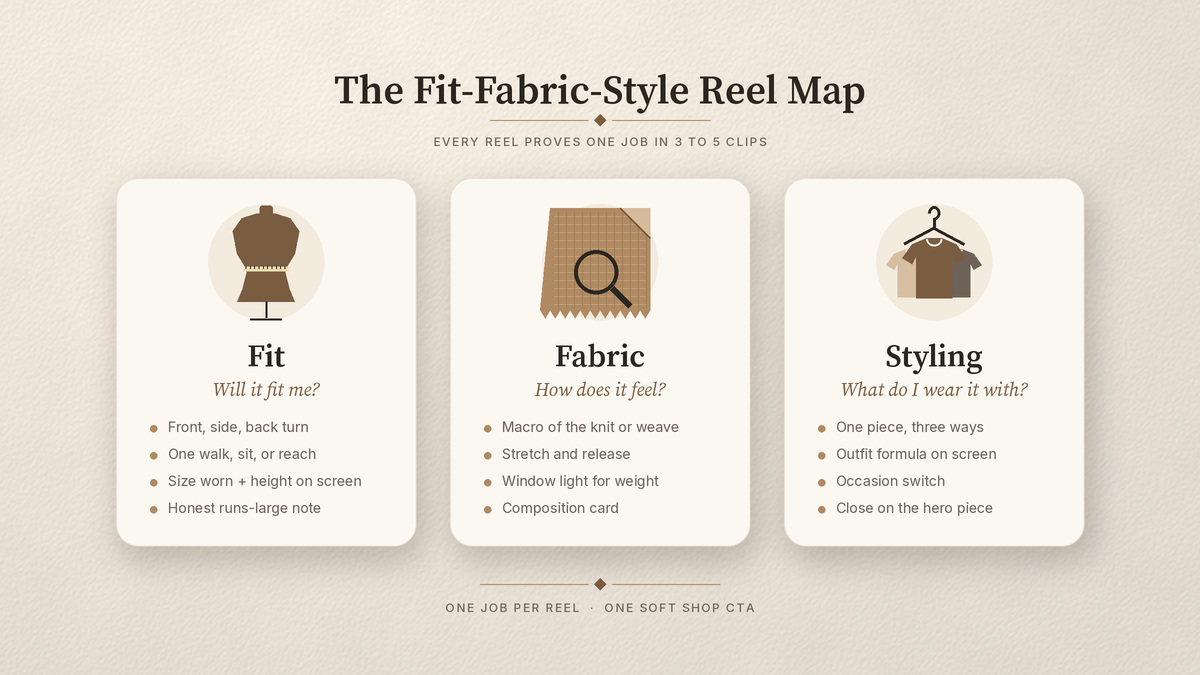
The best fashion and clothing brand Reels ideas answer three buyer questions before the end card: will it fit me, how does it feel, and what do I wear it with? Build every Reel on the Fit-Fabric-Style Reel Map: each idea proves fit (real bodies, a turn, an honest size note), fabric (macro texture, drape, stretch), or styling (one piece worn three ways, an outfit formula), in 3 to 5 clips with one soft shop CTA.
That is the difference between a Reel that sells a piece and another haul video. A haul shows a pile of clothes. A fit, fabric, and styling Reel shows one garment doing its job on a body, in the light, and in an outfit someone can picture in their own wardrobe.
If you need ideas for a non-apparel brand or a whole empty month, start with Instagram Reels ideas for brands when the calendar is blank. This list is for labels, boutiques, and DTC apparel teams.
The Fit-Fabric-Style Reel Map
Every idea in the table below does one main job. Pick the job first, then film the shot list.
- Fit: show the piece on real bodies. Front, side, back, a walk or a sit, and the size worn on screen. This answers “will it fit me?”
- Fabric: show texture, weight, drape, stretch, and stitching up close. This answers “how does it feel, and will it last?”
- Styling: show the same piece in different outfits or occasions. This answers “what do I wear it with, and is it worth the price?”
A Reel can touch two jobs, but it should lead with one. When a Reel tries to prove all three in eight seconds, viewers remember none of them.
Here is the rule worth saving: a clothing Reel earns its slot when a muted stranger can say how the piece fits, how it feels, and what to wear it with before the end card.
11 clothing brand Reels ideas with shot lists
Bookmark this table. Each row is apparel specific and filmable on a phone. Choose five for this week’s pieces.
| Idea | Main job | Shot list (3 to 5 clips) | Soft CTA |
|---|---|---|---|
| Same piece, three bodies | Fit | 1) First frame: piece name plus “worn in S, M, XL” 2) Person one: front, side, back turn 3) Person two: same turn 4) Person three: walk toward camera 5) End card with each size worn | Find your size |
| Honest fit check | Fit | 1) Full-length mirror or tripod shot 2) On-screen note: height, size worn, usual size 3) Close-up of waist, shoulder, or hem 4) Sit, reach, or bend test 5) “Runs true / size down” card | Check the size guide |
| Fit question, answered | Fit | 1) Screenshot or typed version of a real DM or comment 2) Team member puts the piece on 3) The exact detail they asked about (length, rise, sleeve) 4) Answer on screen in one line | Ask us your size |
| Fabric macro | Fabric | 1) Macro of the weave or knit as the first frame 2) Hand stretch and release 3) Fabric held to a window for weight and opacity 4) Drape over a hand or chair back 5) Composition card | Shop the fabric |
| Seam and stitch close-up | Fabric | 1) Inside-out seam macro 2) Buttonhole, zip, or hem detail 3) Gentle tug test on a seam 4) Label with fiber content | See the details |
| Care and wear proof | Fabric | 1) Care label macro 2) Wash or steam step as the label says 3) Dry flat or hang 4) Same piece on a body after care, same angle as before 5) One care tip | Shop with care notes |
| One piece, three ways | Styling | 1) Hero piece alone on a hanger or flat 2) Look one (weekday) 3) Look two (weekend) 4) Look three (evening) 5) Three looks side by side | Shop the piece |
| Outfit formula | Styling | 1) On-screen formula: top plus bottom plus layer plus shoe 2) Each item added in a quick cut 3) Full outfit walk 4) Swap one item to show the formula flexes | Shop the formula |
| Occasion switch | Styling | 1) Same base piece in a work setting 2) Swap shoes and layer 3) Same piece at dinner or travel 4) Close on the base piece | Shop the base |
| Flat-lay to on-body | Fit and styling | 1) Product still or flat-lay 2) Same piece picked up by hand 3) On-body turn 4) Styled detail (tuck, roll, belt) | Shop the look |
| Drop teaser (one only) | Fabric | 1) Macro of a new fabric or color 2) Swatch next to a sketch or pattern 3) Partial silhouette reveal 4) Date card | Get notified |
The drop teaser is the only launch idea here on purpose. One teaser builds curiosity. A full drop sequence is its own plan.
How to show fit without a haul dump
Show one piece on more than one body, and say the size on screen every time. Fit hesitation is about uncertainty, so the fix is information, not more outfits.
Keep these habits for every fit Reel:
- Film front, side, and back in that order so the viewer can compare.
- Add height and size worn as on-screen text, with permission from whoever is wearing it.
- Include one movement: a walk, a sit, or a reach. Clothes look different in motion.
- Be honest when a piece runs large or small. A clear “size down” note helps the right buyer and saves the wrong one a return.
How to prove fabric on a phone
Get closer than feels natural, and let light do the work. A macro of the knit or weave in the first frame tells shoppers more than a logo ever will, and it reads with the sound off.
Window light shows weight and opacity. A slow stretch and release shows recovery. Fabric falling over a hand shows drape. Then name the composition on screen so the texture has a fact behind it. You do not need a studio. You need a steady hand and a bright window.
How to style one piece so it sells
Lead with the piece, then multiply it. “One piece, three ways” works because it answers the cost-per-wear question without you saying a word about price.
An outfit formula does the same job for shoppers who already own half the look. Put the formula on screen in plain words (top, bottom, layer, shoe) and cut each item in. The viewer can rebuild it from their own closet, plus your piece.
Film from the stills you already have
Most apparel teams already own product shots, flat-lays, and lookbook images. Those are a fast start for fabric and styling Reels, especially the flat-lay to on-body idea. When you want the step-by-step, here is how to turn flat-lay and product shots into Reels.
For fit, you still need movement on a real body. Pair stills with a short phone batch: one wearer, three pieces, front, side, back, and a walk for each.
Do this now: a five-Reel apparel week
You can run this checklist with a phone and a notes app.
- Pick five ideas from the table for this week’s pieces. Aim for at least one fit, one fabric, and one styling Reel.
- Write a shot list per idea: hook frame, fit turn, fabric macro, style reveal, soft CTA. Cut anything that does not prove the main job. Need a shape to start from? Remix a proven Reels template.
- Gather footage: pull product stills and flat-lays, then film a short batch on a model, a team member, or yourself.
- Mute-check the first frame. Put the piece name on screen, plus an honest size note when fit is the job.
- Use one CTA per Reel: shop the piece, find your size, or ask a question. Never all three.
- Log keep or kill each week: saves, profile visits, and product clicks. Film more of what earns them.
If you want help with the formats, paste your website into beREEL. It builds Brand DNA (audience, offer type, personas, benefits, tone) and filters a TikTok-style feed of 600+ templates to your buyers, so you remix proven formats onto your pieces. You can make photo and video Reels from the stills and clips you already have. Creating a free account takes about a minute, and you start with 170 free credits, no card needed: www.bereel.pro.
What to skip
Skip the catalog ad in frame one. A logo, a price slash, and a model frozen in a studio pose look like an ad before anyone sees the fit.
Skip trend audio that hides the garment. If the transition is the star, the piece is not.
Skip launch overload. One teaser in the mix is enough for a normal week.
Selling skincare or makeup too? Those formats live in beauty brand Reels that don’t look like ads. Planning seasonal promos? See Black Friday and holiday Reels ideas for ecommerce.
Keep the map, rotate the pieces
The Fit-Fabric-Style Reel Map is a weekly habit, not a one-off campaign. Each week, new pieces go through the same three jobs, with apparel Reels shot lists your team already knows. After a month, your keep-or-kill log will show which jobs your audience saves, which ones send profile visits, and which pieces need more fit proof before people buy.