



In this article
Instagram Reels should be vertical 9:16 video. Instagram Help says you can upload anything from 1.91:1 to 9:16, with a minimum frame rate of 30 FPS and a "minimum resolution of 720 pixels." Instagram's own interface sits on top of your video, so text near the edges can get covered. Meta only publishes measurements for that problem in its ads guidance: keep at least 14% of the top, 35% of the bottom, and 6% of each side clear of text, logos, and other key elements. Meta publishes no safe-zone measurement for organic Reels, so treat the ad numbers as a safe, conservative margin, not an organic rule.
Every number in the table below shows where Meta publishes it (Instagram Help, the Instagram API docs, or the Meta Ads Guide), or is marked as not published by Meta. All specs were checked on October 5, 2026.
The Source-Tagged Spec Table (checked 2026-10-05)
Instagram Reels follow different specs depending on how they get posted. A number from the ads guide doesn't automatically apply to a Reel you upload in the app, and an API limit isn't an app limit. So each row says where it comes from.
| Spec | Value | Source route |
|---|---|---|
| Aspect ratio range | Between 1.91:1 and 9:16 | Instagram Help (organic) |
| Minimum frame rate | 30 FPS | Instagram Help (organic) |
| Minimum resolution | "Minimum resolution of 720 pixels" (Meta doesn't say whether that means width or the short side) | Instagram Help (organic) |
| Recommended cover photo size | 420 × 654 px (1:1.55 ratio) | Instagram Help (organic) |
| Record and edit length in the app | Up to 20 minutes | Instagram Help (organic) |
| Length and recommendations | Reels over 3 minutes won't be recommended to new audiences | Instagram Help (organic) |
| Export settings for best playback | 2K, HDR, and 60 fps ("Instagram will prioritize playback up to those settings") | Instagram for Creators (organic) |
| Ad aspect ratio | 9:16 | Meta Ads Guide (ads) |
| Ad recommended resolution | 1440 × 2560 px | Meta Ads Guide (ads) |
| Ad file types | MP4, MOV | Meta Ads Guide (ads) |
| Ad maximum file size | 4 GB | Meta Ads Guide (ads) |
| Ad video duration | 0 seconds to 15 minutes | Meta Ads Guide (ads) |
| Ad safe zone | Leave at least 14% of the top, 35% of the bottom, and 6% on each side free of text, logos, or other important elements | Meta Ads Guide (ads) |
| Ad safe zone with disclaimers | Leave the bottom 40% free of text, logos, and key elements | Meta Business Help (ads) |
| Vertical ad resolution best practice | At least 1080 × 1920 | Meta Business Help (ads) |
| API file size | 300 MB maximum | Instagram API (publishing) |
| API duration | 3 seconds minimum, 15 minutes maximum | Instagram API (publishing) |
| API maximum width | 1920 horizontal pixels | Instagram API (publishing) |
| API frame rate | 23 to 60 FPS | Instagram API (publishing) |
| API aspect ratio | 0.01:1 to 10:1 accepted; 9:16 recommended "to avoid cropping or blank space" | Instagram API (publishing) |
| API container and codecs | MOV or MP4 (moov atom at the front, no edit lists); HEVC or H264 video; AAC audio, 48 kHz maximum | Instagram API (publishing) |
| API bitrate | Video VBR, 25 Mbps maximum; audio 128 kbps | Instagram API (publishing) |
| API cover image | JPEG, 8 MB maximum, sRGB | Instagram API (publishing) |
| Organic safe zone (% or px) | None given | Not published by Meta |
| Organic recommended pixel size | None given | Not published by Meta |
| In-app file size cap and formats | None given | Not published by Meta |
Sources checked on 2026-10-05: Instagram Help: Reel size and aspect ratios, Instagram Help: Record a reel, Instagram for Creators: export settings, Meta Ads Guide: Instagram Reels video ads, Meta Business Help: text overlays and the safe zone, Meta Business Help: best practices for Instagram video ads, and Meta for Developers: IG User Media, Reel specifications.
What Meta does not publish
Not in any Meta doc we checked on 2026-10-05:
- Organic safe-zone measurements. No Instagram Help or Creators page gives margins in percent or pixels for the regular Reels interface. Every official safe-zone number is for ads.
- An organic recommended pixel size. 1080 × 1920 is widely quoted, but Meta only states it on a best-practices page for video ads. The organic Help Center gives the 720 pixel minimum and the aspect range, nothing more.
- A profile grid ratio for Reel covers. You will see 3:4 quoted a lot. None of the Meta pages we checked publish a grid crop ratio.
- An in-app file size cap. The 4 GB figure is the ads limit, and 300 MB is the API limit. Neither is stated as the app's upload limit.
If a guide gives you an exact organic safe zone in pixels, ask where it came from. It may be a careful measurement, but it isn't Meta's.
Instagram Reels safe zones: what to keep clear
The only safe-zone numbers Meta publishes are for Reels ads. The Meta Ads Guide says to "consider leaving at least 14% of the top, 35% of the bottom, and 6% on each side" of the frame free from text, logos, or other important creative elements. If your Reels ad carries a disclaimer, Meta Business Help says to leave the bottom 40% clear instead.
Meta also explains why the edges matter for ads: on screens taller than 9:16, it may zoom the creative to fill the screen, which can crop areas outside the safe zone.
For organic Reels, Meta is silent. Using the ad margins anyway is a reasonable, conservative choice. Meta doesn't say how the organic interface compares, so the generous margins are the safer bet: a bit of empty space costs you nothing, while a logo under the caption block costs you the logo.
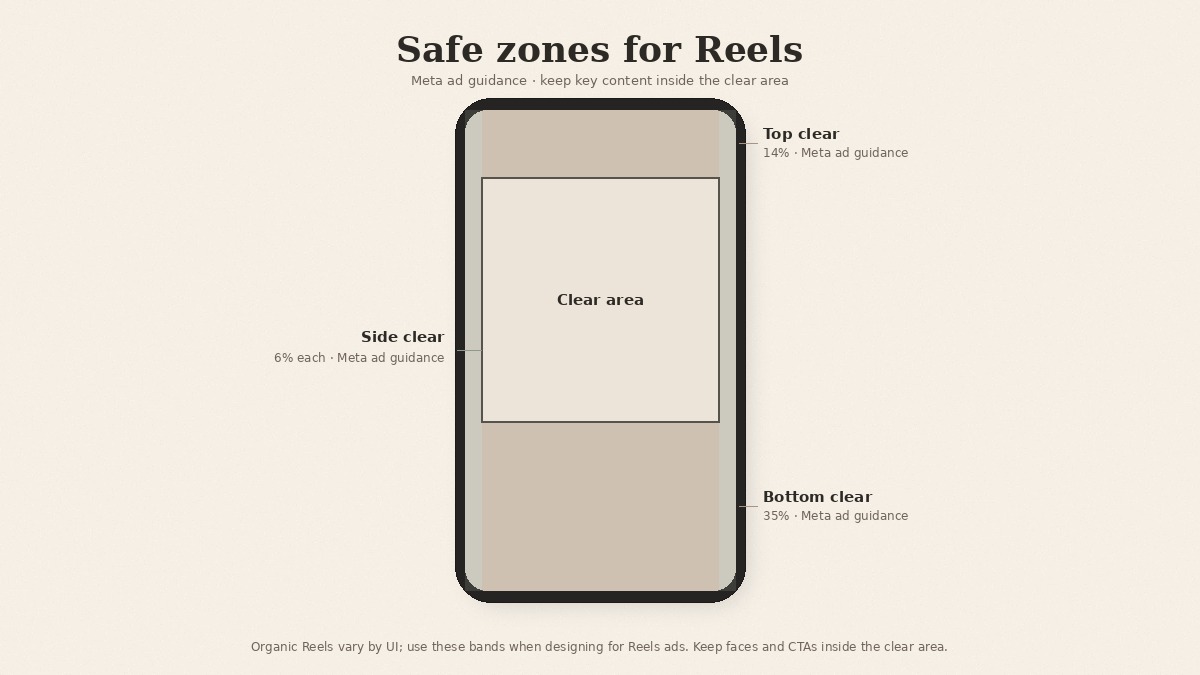
If you want pixels for your editor guides, here is the arithmetic. Calculated from Meta's ad percentages. Not official Meta numbers.
| Margin (calculated from ad %) | 1080 × 1920 frame | 1440 × 2560 frame |
|---|---|---|
| Top, 14% | about 269 px | about 358 px |
| Bottom, 35% | 672 px | 896 px |
| Each side, 6% | about 65 px | about 86 px |
| Clear area left over | about 950 × 979 px | about 1267 × 1306 px |
| Bottom with disclaimers, 40% | 768 px | 1024 px |
What to keep inside that clear area:
- Your logo, so it never sits under the username or the action buttons.
- Brand type and headlines, at a size that still reads on a phone.
- The product itself, especially in the shots where it is the point.
- Burned-in captions, kept above the bottom band rather than tucked against the frame edge.
Sizing and placement are the reference half of the job. When the cut is done, run the pre-publish pass with the first-frame and mute-first caption checklist.
Which specs apply depends on how you post
Three routes, three sets of numbers.
In the Instagram app. The Instagram Help numbers apply: 1.91:1 to 9:16, 30 FPS minimum, 720 pixel minimum, record and edit up to 20 minutes, and no recommendations to new audiences past 3 minutes. Help also describes a setting to always upload Reels at the highest quality (Profile, Menu, Media quality), with a note that higher quality uploads can take longer. For export, Instagram for Creators suggests 2K, HDR, and 60 fps for the best playback.
Through the API or a scheduling tool. If your tool publishes through Instagram's API, the API's Reel specs are the ones to plan for: 300 MB maximum, 3 seconds to 15 minutes, no more than 1920 horizontal pixels, 23 to 60 FPS, MOV or MP4. Note the width cap: anything wider than 1920 pixels is over the API limit, so check it before you export at higher resolutions.
As an ad or boosted Reel. The Meta Ads Guide applies: 9:16, 1440 × 2560 recommended, MP4 or MOV, up to 4 GB, 0 seconds to 15 minutes, and the 14% / 35% / 6% safe zone. Meta also says it may automatically transform non-9:16 ad media by applying templates that fit full-screen vertical screens, so delivering 9:16 yourself keeps the framing in your hands.
Reel cover specs
Instagram Help recommends a cover photo of 420 × 654 px (a 1:1.55 ratio) and currently says you can't edit the cover after you've uploaded the Reel, so choose it at share time. If you publish through the API, the cover must be a JPEG of 8 MB or less in sRGB, and a cover that isn't 9:16 gets cropped to the middle 9:16 rectangle. Cover design is a separate topic, so we'll leave it there.
Uploading something that isn't 9:16
Instagram Help lets you upload a Reel anywhere between 1.91:1 and 9:16, so a square or landscape clip won't be rejected. We still recommend 9:16 for every Reel. It fills the vertical screen, it matches what Meta recommends for Reels ads and for API publishing, and it means you decide what gets framed instead of leaving it to a crop.
If your source material is product photography shot square or landscape, crop product photos to 9:16 before you build the Reel, and keep the product inside the clear area above.
Is 1080 × 1920 the right size for Reels?
It's a sensible 9:16 export, but it isn't an organic Instagram spec. Meta states it on a best-practices page for video ads. The Ads Guide recommends 1440 × 2560 for Reels ads, and Instagram for Creators suggests exporting at 2K for the best playback. If you publish through the API, keep the width at 1920 pixels or less.
How long can an Instagram Reel be?
Instagram Help says you can record and edit Reels up to 20 minutes in the app, and that Reels over 3 minutes won't be recommended to new audiences. The API allows 3 seconds to 15 minutes, and Reels ads run 0 seconds to 15 minutes. Help also notes that Reels features aren't available to everyone, so your account may differ.
DIY checklist: Reels size and safe zones
Use this when you set up an export or a new template. It covers specs only, not first-frame QA.
- Export at 9:16. It sits inside Help's 1.91:1 to 9:16 range. Aim for at least the 720 pixel minimum resolution and 30 FPS that Instagram Help lists.
- Mind the length. In-app record and edit runs up to 20 minutes, but Reels over 3 minutes won't be recommended to new audiences.
- Match the route. If you schedule through the API or a tool, use the API limits (300 MB, 3 seconds to 15 minutes, 1920 horizontal pixels maximum), not the ad limits.
- Keep brand assets off the edges. Logos, brand type, product, and burned-in captions stay clear of the frame edges. For ads and boosted Reels, use Meta's 14% top, 35% bottom, 6% sides guidance. For organic, treat those same numbers as conservative guidance only, because Meta publishes no organic safe-zone measurement.
- Then run the real QA pass. After export, check the actual cut with the first-frame and mute-first caption checklist linked above.
If you're still deciding what to post next, start with Instagram Reels ideas for brands (blank calendar).
A safe-zone number without a source is a guess with a pixel count. Label where each number comes from, and you'll know which ones you can trust.
Keep captions and brand type in the safe area with beREEL
The checklist above works in any editor. Where teams lose time is rebuilding the same safe framing, captions, and brand type for every new Reel.
beREEL starts from your website: paste it in and it builds Brand DNA (audience, offer type, personas, benefits, tone), then filters a TikTok-style feed of 600+ templates to that audience. You remix a format onto your product or service, and the editor handles pace, crop, and cut, with captions in the safe area in your brand type. Still check the specs above for wherever you post.
Creating a free account takes about a minute, and you start with 170 free credits, no card needed: www.bereel.pro.